Frequently asked
 |
 |
Copyrights
What is the most recent newspaper and journal publication year available in the digi.kansalliskirjasto.fi service?All newspapers published up to 31 December 1939 are openly available in the digi.kansalliskirjasto.fi service, as are Swedish-language newspapers up to the end of 1949. Some individual volumes of more recent newspapers and journals may have been digitised and made available thanks to separately funded digitisation projects.
Where can I access more recent digitised newspapers and journals that are not openly available in the digi.kansalliskirjasto.fi service?
All materials digitised by the National Library of Finland, including copyrighted material, can be accessed onsite in all Finnish legal deposit libraries, namely the National Library, the Turku University Library, the Jyväskylä University Open Science Centre, the Åbo Akademi Library, the Oulu University Library and the University of Eastern Finland Library. More recent material can be read at the legal deposit libraries.
Can I use the content in the digi.kansalliskirjasto.fi service (pages, images) in my own publication or equivalent material?
Some material available in the digi.kansalliskirjasto.fi service is currently copyrighted. Before using any material in your own publication, verify whether it is protected by copyright. If it is in the public domain, you can use it in your publication. Otherwise, you need permission from the author or their representative. The National Library does not hold copyrights to any material and cannot therefore give permission for their use. In connection with making some material available, agreements have been made on their potential use. For more information, click on the lock icon under the title.
How long is copyright protection?
Copyright protection extends 70 years from the author's year of death. Photographs (for example, standard press photographs) are protected by a 50-year period of related rights from the year the image was taken. If the photographer or author is mentioned, verify their years of birth and death before any republication. You can also request permission from the original contributor or ask for advice from the Finnish copyright management organisation Kopiosto at neuvonta(at)kopiosto.fi.
Section 22 of the Finnish Copyright Act provides for the right to quote a work made public, in a manner required by proper usage to the extent necessary for the purpose.
For books, you can verify their copyright status from the bibliographic information (the 'i' button in the page view).
Can I freely publish online images of articles or pages of books if 70 years have passed from the author’s death?
Yes. Once 70 years have passed since the author’s death, the copyright expires and the material enters the public domain.
If less than 70 years have passed from the death of an author of a book or article, can I quote parts of their text?
Yes. If the copyright is still valid, you can quote the material “in a manner required by proper usage to the extent necessary for the purpose” (Section 22 of the Finnish Copyright Act). You can also use photographs in the case of academic publications. Publishing online is not considered quoting.
Why should I log into the digi.kansalliskirjasto.fi service?
- When logged in, you can save your search history and make virtual clippings of the material.
- You can also browse the clippings in your own clipbook and edit them. Please note that the clippings you have created will be visible to all users with similar access to the original material.
- If your higher education institution is party to the Tutkain agreement, you can use your Haka credentials to access, for research purposes, newspapers and journals published after 1939. Read more about the Tutkain service.
How should I cite the material in the digi.kansalliskirjasto.fi service?
When using materials in the digi.kansalliskirjasto.fi service, indicate your source in the following fashion: ‘digi.kansalliskirjasto.fi, Wiipuri, 31 December 1904. National Library of Finland collections.’ The materials and clippings include a tool that provides specific reference details.
Can I post on social media material that I have found in the digi.kansalliskirjasto.fi service?
Some material available in the digi.kansalliskirjasto.fi service may currently be protected by copyright. Before using any material in your posts, you must verify whether it is protected by a valid copyright. The National Library of Finland does not hold copyrights to any material and cannot therefore give permission for their use. If the material is in the public domain, you can use it freely.
For example, as classified advertisements usually include no copyrighted content, they can be published on social media.
If the material is protected by copyright, you can create a clipping and include in your post a link to it or the page in digi.kansalliskirjasto.fi.
I would like to have a copy of a page in a specific newspaper. Is it possible to obtain a reproduction of this page?
You can order reproductions of material in the National Library's collections. The service is subject to a fee. Read more about the Reprographic Service.
Can I access all digitised material from my home computer?
No, you cannot access all digitised material from your computer. In addition to material openly available online, you can, using your institutional user credentials, access material for restricted use under the Tutkain agreement between certain higher education institutions. The Tutkain service does not, however, cover all material.
Where can I read more about copyright?
You can read about copyright on copyright management organisations’ websites: Kopiosto, Kuvasto (copyright information in Finnish only) and Sanasto (copyright information in Finnish only). In addition, you can find information about copyright in Finnish on the following websites: tekijanoikeus.fi and Opettajan tekijänoikeus ('Copyright for teachers').
How can I access non-digitised material?
All newspapers published until the end of 2023 have been microfilmed. They can be studied in the National Library’s North Hall, which houses the microfilms of all Finnish newspapers up to 1945. Microfilms of newspapers with a wide circulation, up to the end of 2023, are available on the shelves. Microfilms of regional newspapers from 1946 onwards can be requested with a two day's notice.
The newspapers can be browsed in the National Library search service. A National Library card is required for placing requests.
Where can I read restricted material?
There are a variety of options available.
- All material digitised by the National Library can be read at the legal deposit libraries.
- If your higher education institution is party to the Tutkain agreement, you can use your Haka credentials to access newspapers and journals published up to the end of 2024.
- Historical labour newspapers can be read at the Library of the Labour Movement, the Finnish Labour Archives, the Finnish Peoples’ Archives and the Finnish Labour Museum Werstas.
Where can I read digitised Swedish-language newspapers?
All Swedish-language newspapers published in Finland have been digitised, with those published up to the end of 1949 freely accessible in the digi.kansalliskirjasto.fi service. Digitised Swedish-language newspapers from 1950 to 2018 can be read onsite at the following libraries and archives:
- The National Library of Finland and other legal deposit libraries
- Society of Swedish Literature in Finland, reading rooms in Helsinki and Vaasa
- Provincial Archives of Åland, reading room in Mariehamn
Can I access the materials in digi.kansalliskirjasto.fi from abroad?
Yes.
Search and metadata
How does the search function in the digi.kansalliskirjasto.fi service work?
Enter your search terms in the search field and click the search button (magnifying glass icon). You can select filters such as the title, place or time of publication, specific pages, or combinations thereof in the relevant fields.
How is the search accuracy determined?
For each hit the search engine calculates a value based on the search term’s frequency on a page in proportion to the total number of words on the page (and the overall frequency of the term). The accuracy of the calculation varies in relation to the search terms. For example, fuzzy searches compare orthographic similarity to the search term.
Why is the issue number missing for some newspapers and journals, or why is the issue number 0?
Over the years, there have been varying practices for numbering newspaper and journal issues. Usually, issue number 0 denotes a sample issue.
How do I use the special characters of different languages in searches?
You can use special characters in searches, such as the Nordic characters æ and Æ (for example, æble). As text recognition errors may occur with such characters, it might be useful to replace one such character with a question mark (?) or replace several characters with an asterisk (*).
General
Do you wish to provide feedback?
You can send feedback by email at kansalliskirjasto@helsinki.fi .
Where can I find instructions for using the digi.kansalliskirjasto.fi service?
The National Library’s YouTube channel offers an instructional video with English subtitles:
Why is the search context for some ephemera not visible?
As text recognition has not been undertaken for ephemera related to industrial history, highlighting the search term does not work for them.
Why is the year 1810 indicated as the year of publication for some ephemera?
If the year of publication is not indicated, the time range of the collection is displayed instead, for example 1810–1944. In such cases, the system is not able to indicate that the year or time range is not accurate.
On what basis does the National Library choose materials to be digitised?
Future digitisation efforts are guided by the National Library's digitisation programme. The Library aims to create a critical mass of consistent and high-quality content for public and research use through long-term digitisation. Digitisation enables the Library to make its unique collections more visible and equally accessible and usable to all. For more information, see the National Library of Finland website.
Why are search terms not always highlighted?
Search terms are coloured through text recognition with the help of coordinates created for each word. If the words are not highlighted correctly, most often the reason may be an error in text recognition (for example, confusion between the letters ‘c’ and ‘e’), or a special character in a search word or between words. Using the additional functions in the top bar, you can check the search words that led to the page and edit them if necessary. If you encounter any other problems, please send feedback and a link to the page where the problem occurred. A link to the feedback form is available at the top of the page.
Which newspapers and journals have had all their published issues digitised? How much has been digitised?
Finnish-language newspapers have been digitised up to the end of 1959 and quite a few also beyond that date. Newspapers published since 2017 have all been comprehensively digitised. Moreover, all Swedish-language newspapers published in Finland have been digitised.
Periodicals of general interest have been digitised up to 1939, as have other journal titles of wide circulation.
You can check the volumes of various journal titles available in the digi.kansalliskirjasto.fi service from the list of serial publications.
The National Library has digitised some newspapers as part of externally funded projects. All published issues of newspapers Länsi-Savo, Etelä-Suomen Sanomat, Maaseudun Tulevaisuus and Uusi Suomi have been digitised. The dailies Helsingin Sanomat and Ilta-Sanomat have been digitised up to the end of 1979.
Which newspapers and journals have been digitised in colour?
For all material, the need for storage space is considered separately, as coloured material requires many times more space than greyscale images. Old newspapers containing millions of pages have been digitised in greyscale, because their digitisation could be done efficiently from existing microfilms and the original content was greyscale to start with. The National Library has received additional funding from partners, such as publishers, which has enabled colour digitisation. In the National Library’s newspaper project, new issues of newspapers are scanned in colour.
Technical issues
Why can't I log in?
Ensure that you are using the correct username and password. Please note that Facebook login has been disabled.
I have created clippings using Facebook credentials. How can I access my clipping?
You can request the transferral of your clippings to another username or request new credentials through the digi.kansalliskirjasto.fi feedback form. A link to the feedback form is available at the top of the page. From time to time, you should save backup copies of your clippings on your computer using the ‘Load results as Excel file' feature under Clippings. You can also use the download tool in the service.
Why did my Haka login fail?
If your Haka login failed, you should try clearing the cookies in your browser. For example, in Firefox, under
- Open Firefox
- Click ☰ Menu → Settings
- Go to Privacy & Security
- Under Cookies and Site Data, click Manage Data…
- In the search box, type digi.kansalliskirjasto.fi
- Select the site
- Click Remove Selected
- Click Save Changes
How can I renew my Digiweb account?
You can renew your Digiweb credentials in the login window. Select ‘Digiweb’ and a link to the renewal function will appear at the bottom of the window.
Why does digi.kansalliskirjasto.fi not open on an iPad?
Usually the reason is that the browser is in 'private browsing' mode. In this case the top bar of the browser is black. You can exit this mode in Safari.
- Open Safari.
- Tap the Tabs button (two overlapping squares) at the bottom-right.
- At the bottom of the screen, tap Private.
- Tap Tabs (or a number like “3 Tabs”).
- Tap Done
Clippings
What are clippings? Who can see clippings?
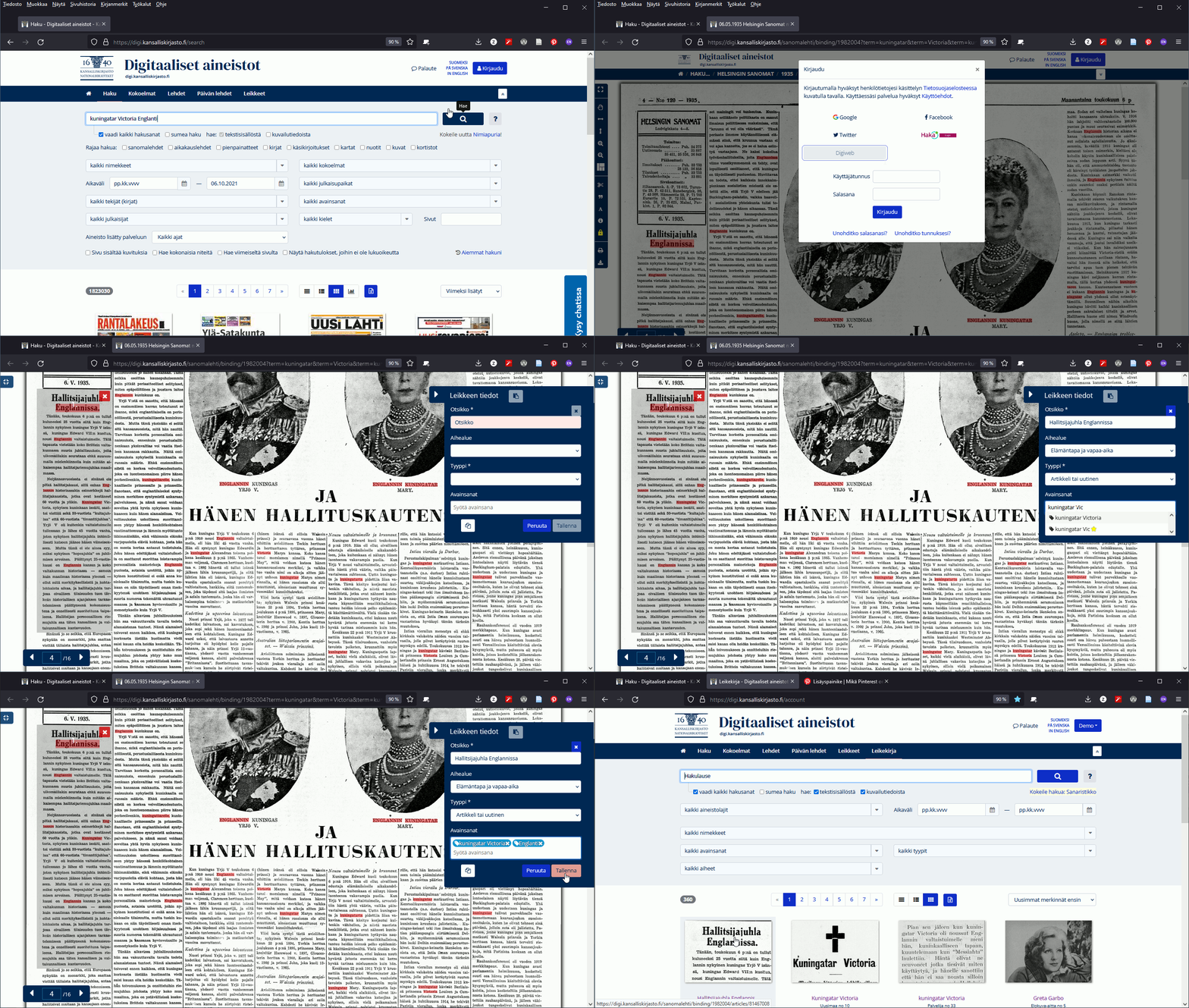
Clippings are notes or bookmarks for items of interest, such as news items, advertisements or images. Clippings are public and can be viewed by all service users, as they can be accessed using the same credentials as other material in digi.kansalliskirjasto.fi. NB! The terms of use permitting, instead of creating a clipping you can print out a page using your computer’s or browser’s print function. On legal deposit workstations, you can print out a page or part of a page.
What happens to clippings if access rights to the material expire?
If material is available for a fixed period under a specific agreement, it cannot be accessed once the agreement expires. The clippings remain intact, but can only be used in locations providing access to them.
How do I create a clipping?
Go to the page of your choice and click on the scissors icon in the top bar. If you are not logged into the service, log in. Select the area to be clipped and add metadata to the required fields (title, topic and keywords). Click ‘Save’. NB! Once saved, the clipping will appear in your own clipbook and on the Clippings list, where it is visible to all users.
I have no social media credentials. How can I create a clipping?
You can request credentials through the digi.kansalliskirjasto.fi service feedback form. A link to the form is available at the top of the page.
How can I log in and create a clipping on a legal deposit workstation?
On legal deposit workstations, you can create clippings only when logged in using a designated username and password, so request these credentials beforehand. Clippings from material protected by copyright cannot be used anywhere else than the legal deposit workstations.
Please also note that the legal deposit workstation user credentials can only be used for creating clippings: they do not provide you with user rights to the material.
How can I make a backup copy of my clippings?
Log in using the credentials that you wish to use for making a backup copy of your clippings. Go to the Clipbook page. To download the clipping on your computer, click on ‘Load results as Excel file’. (If the clipping is missing the text, check from the settings that 'Article search Excel: display article OCR text' is selected.)
How can I delete a clipping?
Log in using the same credentials that you used when creating the clipping. Select 'My clipbook' and change the style of the clipbook to ‘condensed list’. The bin icon is on the right. Deleting the clipping will remove it from your clipbook, but it will remain in the material-specific clippings stream. For technical reasons, it will take some time before a clipping disappears from your clipbook.
Other queries
How can I print a single page or an article?
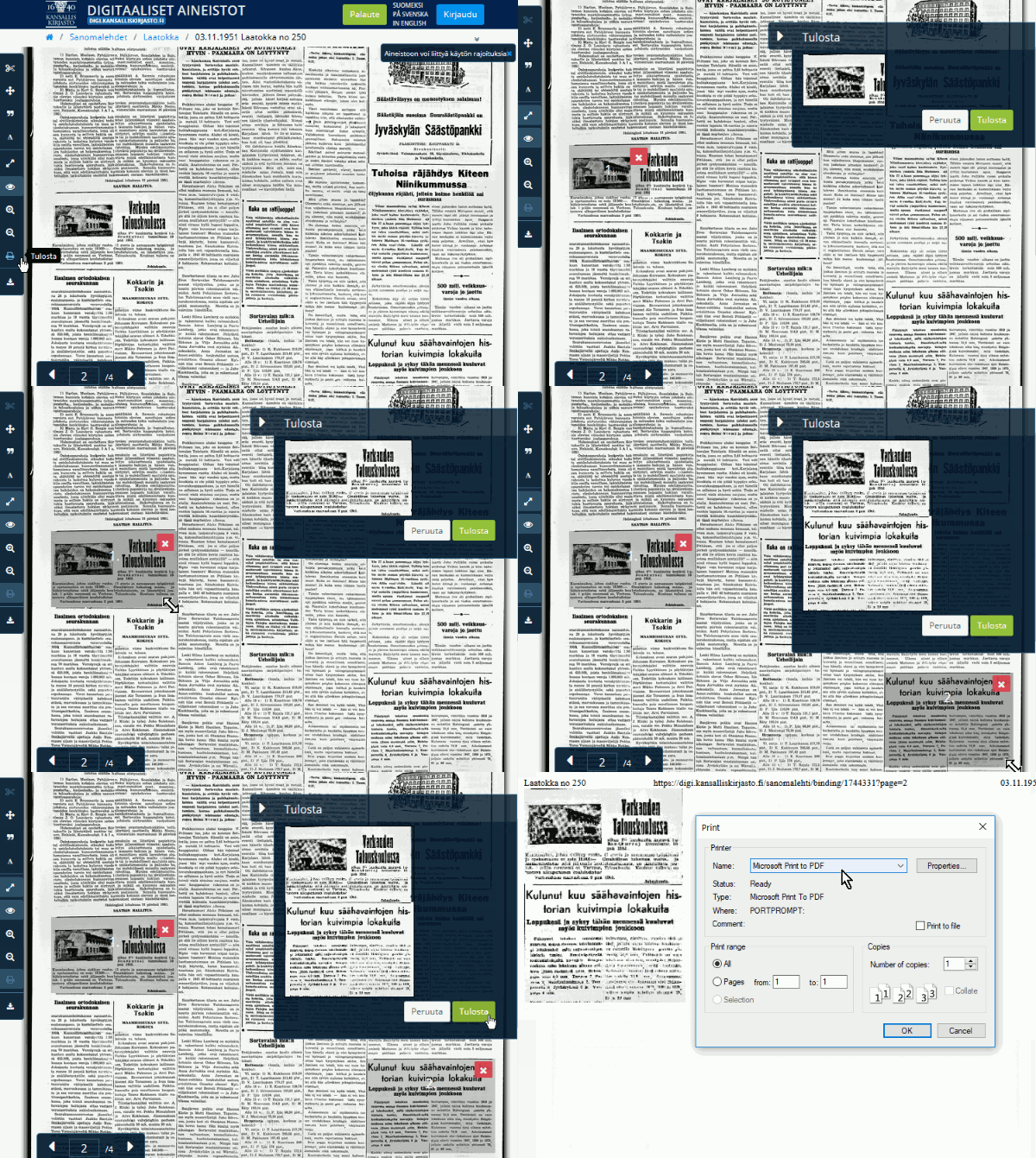
- Open the page of your choice, zoom in (or out) to your preferred size, and select ‘Print’ .
- Select the areas you wish to print on one or several pages, and verify your selection in the preview window.
- Clicking on ‘Print’ will send the page to your printer.
If you need an entire page printed, you can print it by selecting ‘File’ then ‘Print’ in your browser. The service will automatically scale the page to A4 size.
How can I perform searches for an individual newspaper or journal?
You can search for a specific newspaper or journal title by selecting it from the dropdown menu of all titles. Click on the title field and enter the name of the newspaper or journal, or its ISSN. Click on the title of your choice and close the list of titles. Now you have the selected newspaper or journal ready for your search. (If you write the title of the newspaper or journal in the search field, the search is performed on all content, likely resulting in too many search results, which is not ideal.)
How can I select the newspaper or journal published on a certain date?
You can enter the date of your choice directly in the time range fields. For example, you can enter the year 1920, and the date will appear automatically. You can also select the date from the calendar.
Which interfaces are available for the digi.kansalliskirjasto.fi service?
The digi.kansalliskirjasto.fi service offers OAI-PMH interface, a harvesting interface for obtaining metadata records. Further information about using the interface.